在前端开发过程中,HTML 的 iframe 标签是一种强大的工具,但很多初学者往往对它的用法感到困惑。那么,iframe 标签的真正魅力是什么?它有哪些具体的应用场景?今天的这篇详解图文教程,带你一探究竟!
iframe(内联框架)是HTML中的一个标签,用于在当前网页中嵌入另一个网页。它可以创建一个"网页中的网页"。
<!-- 基本语法 -->
<iframe src="目标网址" width="高度" height="宽度"></iframe>

属性 | 说明 | 示例 |
|---|---|---|
| 指定嵌入页面的URL |
|
| 设置iframe宽度 |
|
| 设置iframe高度 |
|
| 为iframe命名 |
|
| 无障碍访问标签 |
|
| 直接嵌入HTML代码 |
|
<!DOCTYPE html>
<html>
<head>
    <title>iframe基础示例</title>
    <style>
        .iframe-container {
            border: 1px solid #ddd;
            border-radius: 8px;
            overflow: hidden;
            margin: 20px 0;
        }
    </style>
</head>
<body>
    <h2>嵌入百度地图示例</h2>

    <div class="iframe-container">
        <iframe
            src="https://map.baidu.com"
            width="100%"
            height="500"
            title="百度地图"
            name="mapFrame"
            allowfullscreen>
        </iframe>
    </div>

    <h2>嵌入视频示例</h2>

    <div class="iframe-container">
        <iframe
            src="https://player.bilibili.com/player.html?aid=123456"
            width="100%"
            height="400"
            frameborder="0"
            scrolling="no"
            title="视频播放器">
        </iframe>
    </div>
</body>
</html><iframe src="https://trusted-site.com" sandbox="allow-scripts allow-same-origin" allow="camera; microphone" referrerpolicy="no-referrer-when-downgrade" loading="lazy"> </iframe>
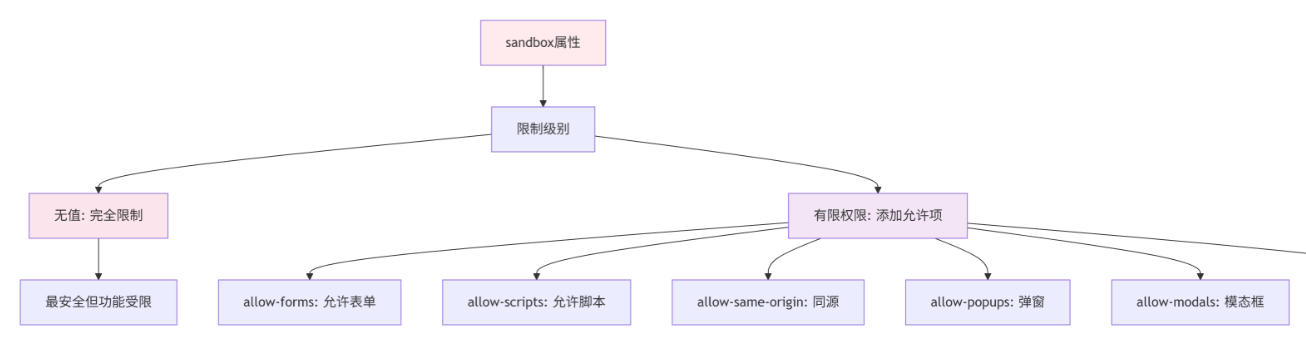
<iframe
    src="https://payment.example.com/pay"
    width="100%"
    height="600"
    sandbox="allow-forms allow-scripts allow-same-origin"
    allow="payment"
    referrerpolicy="strict-origin-when-cross-origin"
    loading="lazy"
    title="安全支付页面"
    style="border: 1px solid #e0e0e0; border-radius: 4px;">
</iframe>
<!-- 主页面 parent.html -->
<!DOCTYPE html>
<html>
<head>
    <title>父页面</title>
</head>
<body>
    <h2>父页面</h2>
    <input type="text" id="parentInput" placeholder="输入信息到子页面">
    <button onclick="sendToChild()">发送到子页面</button>

    <iframe
        src="child.html"
        id="myFrame"
        width="100%"
        height="300">
    </iframe>

    <script>
        function sendToChild() {
            const input = document.getElementById('parentInput').value;
            const iframe = document.getElementById('myFrame');
            iframe.contentWindow.postMessage(input, '*');
        }

        // 接收子页面的消息
        window.addEventListener('message', function(event) {
            console.log('收到子页面消息:', event.data);
        });
    </script>
</body>
</html>
<!-- 子页面 child.html -->
<!DOCTYPE html>
<html>
<head>
<title>子页面</title>
</head>
<body>
<h3>子页面</h3>
<input type="text" id="childInput" placeholder="输入信息到父页面">
<button onclick="sendToParent()">发送到父页面</button>
<script>
// 接收父页面的消息
window.addEventListener('message', function(event) {
console.log('收到父页面消息:', event.data);
});
function sendToParent() {
const input = document.getElementById('childInput').value;
window.parent.postMessage(input, '*');
}
</script>
</body>
</html><!-- 主页面 -->
<iframe src="https://other-domain.com/form" id="externalFrame"></iframe>
<script>
const iframe = document.getElementById('externalFrame');
// 监听子页面消息
window.addEventListener('message', function(event) {
// 验证来源
if (event.origin !== 'https://other-domain.com') {
return; // 拒绝不可信来源的消息
}
console.log('安全接收的消息:', event.data);
});
// 向子页面发送消息
function sendToIframe(data) {
iframe.contentWindow.postMessage(data, 'https://other-domain.com');
}
</script><!DOCTYPE html>
<html>
<head>
<title>响应式iframe</title>
<style>
.responsive-container {
position: relative;
width: 100%;
padding-top: 56.25%; /* 16:9 比例 (9/16=0.5625) */
height: 0;
overflow: hidden;
}
.responsive-iframe {
position: absolute;
top: 0;
left: 0;
width: 100%;
height: 100%;
border: none;
}
/* 4:3 比例 */
.ratio-4-3 {
padding-top: 75%; /* 3/4=0.75 */
}
/* 1:1 比例 */
.ratio-1-1 {
padding-top: 100%;
}
</style>
</head>
<body>
<h2>响应式视频嵌入(16:9)</h2>
<div class="responsive-container">
<iframe
class="responsive-iframe"
src="https://player.bilibili.com/player.html?aid=123456"
allowfullscreen>
</iframe>
</div>
<h2>响应式地图嵌入(4:3)</h2>
<div class="responsive-container ratio-4-3">
<iframe
class="responsive-iframe"
src="https://map.baidu.com"
allowfullscreen>
</iframe>
</div>
</body>
</html><!-- Twitter 推文嵌入 --> <iframe src="https://platform.twitter.com/embed/Tweet.html?id=123456789" width="550" height="300" style="border: none;" scrolling="no"> </iframe> <!-- YouTube 视频嵌入 --> <div class="video-container"> <iframe width="560" height="315" src="https://www.youtube.com/embed/dQw4w9WgXcQ" title="YouTube视频播放器" frameborder="0" allow="accelerometer; autoplay; clipboard-write; encrypted-media; gyroscope; picture-in-picture" allowfullscreen> </iframe> </div>
<!-- 在线客服 -->
<iframe
    src="https://chat.example.com/widget?id=your-id"
    width="300"
    height="400"
    style="border: none; position: fixed; bottom: 20px; right: 20px;"
    title="在线客服">
</iframe>

<!-- 支付页面 -->
<div class="payment-modal">
    <iframe
        id="paymentFrame"
        src="https://payment.example.com/checkout"
        width="100%"
        height="600"
        sandbox="allow-forms allow-scripts allow-same-origin"
        title="支付页面">
    </iframe>
</div>
<!-- 使用原生loading属性 -->
<iframe
    src="https://example.com"
    loading="lazy"
    width="100%"
    height="400">
</iframe>

<!-- JavaScript实现懒加载 -->
<div class="lazy-iframe" data-src="https://example.com"></div>

<script>
document.addEventListener('DOMContentLoaded', function() {
    const lazyIframes = document.querySelectorAll('.lazy-iframe');

    const observer = new IntersectionObserver((entries) => {
        entries.forEach(entry => {
            if (entry.isIntersecting) {
                const iframe = document.createElement('iframe');
                iframe.src = entry.target.dataset.src;
                iframe.width = '100%';
                iframe.height = '400';
                iframe.style.border = 'none';
                entry.target.appendChild(iframe);
                observer.unobserve(entry.target);
            }
        });
    });

    lazyIframes.forEach(iframe => observer.observe(iframe));
});
</script><iframe
id="myFrame"
src="https://example.com"
onload="iframeLoaded()"
onerror="iframeError()"
width="100%"
height="400">
</iframe>
<div id="fallback" style="display: none;">
<p>抱歉,无法加载该内容。请<a href="https://example.com" target="_blank">点击这里</a>访问。</p>
</div>
<script>
function iframeLoaded() {
console.log('iframe加载成功');
}
function iframeError() {
const iframe = document.getElementById('myFrame');
const fallback = document.getElementById('fallback');
iframe.style.display = 'none';
fallback.style.display = 'block';
console.error('iframe加载失败,显示备用内容');
}
</script>问题现象 | 可能原因 | 解决方案 |
|---|---|---|
空白页面 | 跨域限制 | 检查控制台错误,确保目标站点允许嵌入 |
内容被剪切 | 内联样式限制 | 在iframe中添加 |
无法点击链接 | sandbox限制 | 添加 |
加载缓慢 | 资源过多 | 使用 |
高度不适应 | 固定高度 | 使用JS动态调整高度 |
// 同源iframe高度自适应
function resizeIframe(iframe) {
    iframe.style.height = iframe.contentWindow.document.documentElement.scrollHeight + 'px';
}

// 跨域iframe高度自适应(需目标站点配合)
window.addEventListener('message', function(event) {
    if (event.data.type === 'resize') {
        const iframe = document.getElementById('myIframe');
        iframe.style.height = event.data.height + 'px';
    }
});✅ 必须检查的项目:
验证嵌入来源是否可信
设置合适的sandbox属性
使用HTTPS协议
添加referrerpolicy
实现消息来源验证
提供备选内容
添加合适的标题(无障碍访问)
❌ 避免的做法:
嵌入不可信来源
使用过松的sandbox配置
不验证postMessage来源
忽视无障碍访问
允许自动播放媒体
虽然iframe在某些场景下仍然有用,但可以考虑以下现代替代方案:
场景 | iframe方案 | 现代替代方案 |
|---|---|---|
嵌入地图 | iframe嵌入 | 使用地图API(百度/高德/Google Maps SDK) |
社交媒体 | iframe嵌入 | 使用官方提供的JavaScript SDK |
视频播放 | iframe嵌入 | 使用video.js等播放器库 |
第三方登录 | iframe弹窗 | OAuth 2.0 + 弹窗API |
支付流程 | iframe嵌入 | 支付API + 服务器端集成 |
iframe是一个强大但需要谨慎使用的工具。记住以下几个关键点:
安全性第一:始终配置合适的sandbox属性
性能优化:对非关键iframe使用懒加载
响应式设计:确保在各种设备上正常显示
备选方案:为无法加载的内容提供备选显示
现代评估:考虑是否有更好的技术替代方案
正确使用iframe可以极大地增强网站功能,但不当使用可能导致安全漏洞和性能问题。希望本教程能帮助您更好地理解和使用iframe!